
Drop the Packsie staff dashboard onto a Bricks page like any other element. Same dashboard, same permissions, just where you'd expect to find it.
14-day refund
A$99
The packer who’s only ever there on Tuesdays. The returns lead who shouldn’t see your customer list. Packsie gives your team the work they need on a clean page at the front of your site, using HQ’s rules and your brand. No wp-admin. No accidental double-packing. No permissions audit every time you hire.
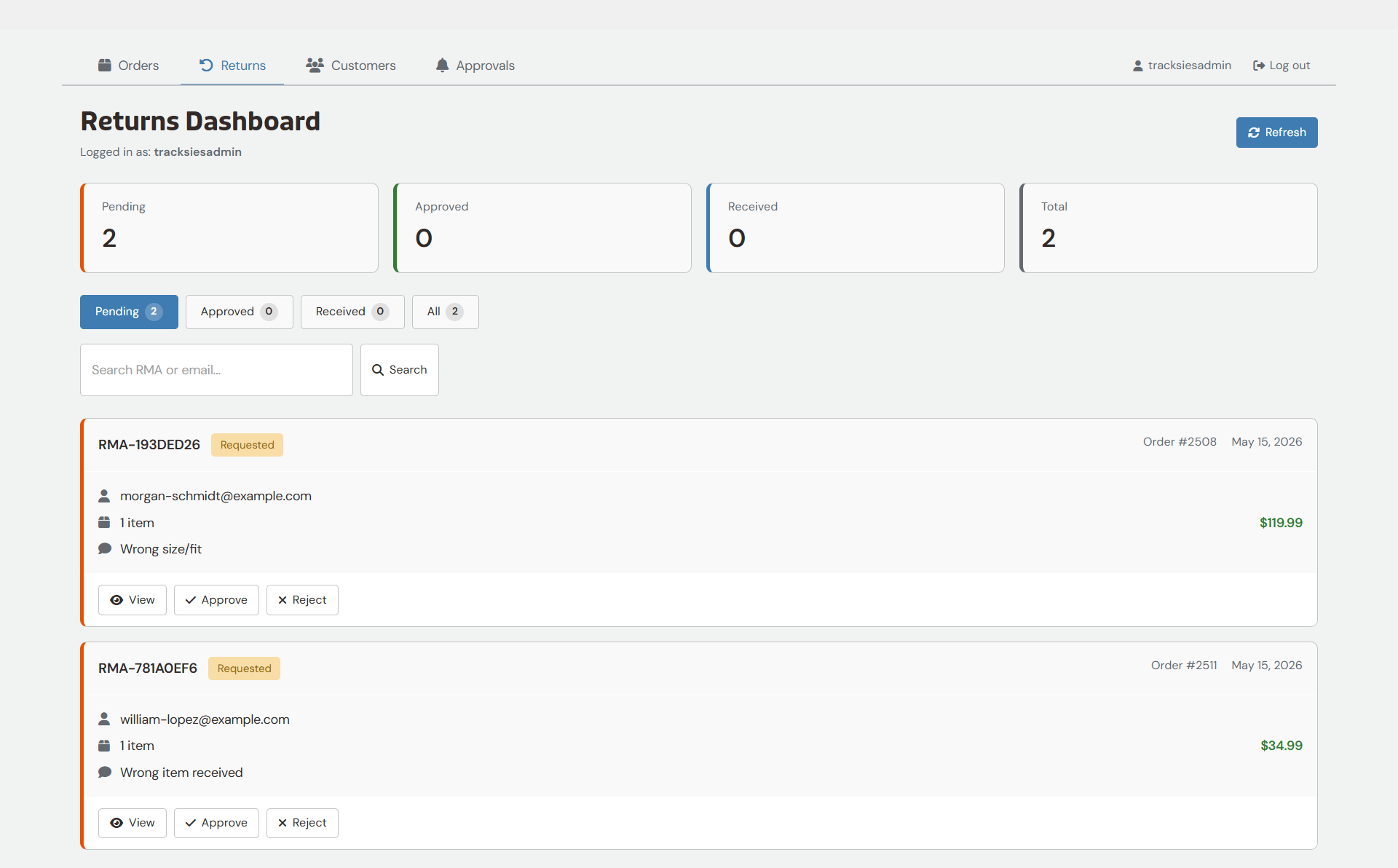
Your returns team gets their own dashboard, separate from packing, with their own permissions. They inspect what came back, note the condition, recommend the resolution, but the refund button itself stays in your hands (or whoever you trust with it). Junior staff process the work; you sign off on the bit that moves money.
Same return engine HQ runs; same per-item resolution logic; same brand-styled customer emails firing automatically as the return progresses.
WordPress roles stack, so Packsie’s Packer role layers onto whatever your staff already are. Editor + Packer for the content person who helps pack during busy season. Customer + Packer for the team member with their own customer account. Administrator + Packer for the owner who wants a clean packing view without going through wp-admin. Nobody loses what they already had. They just gain the dashboard.
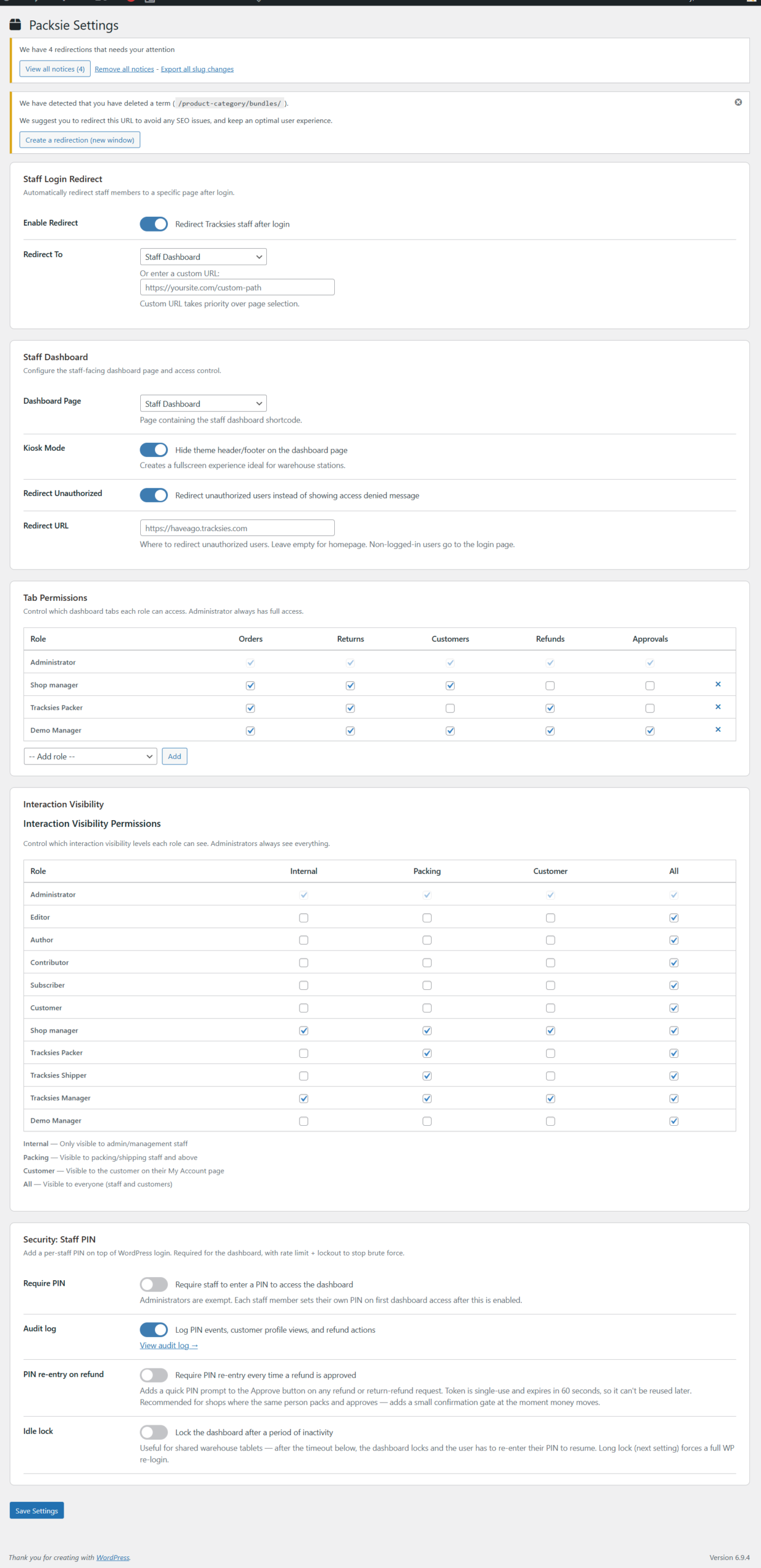
The dashboard lives on a regular page on your site, which means it needs proper guard rails — and Packsie ships them in. Search engines are blocked from finding it. Logged-out visitors get redirected to login. Logged-in users without the right role see Access Denied. Every action re-checks the user’s permissions on submission so stale tabs and shared computers don’t fire actions they shouldn’t.
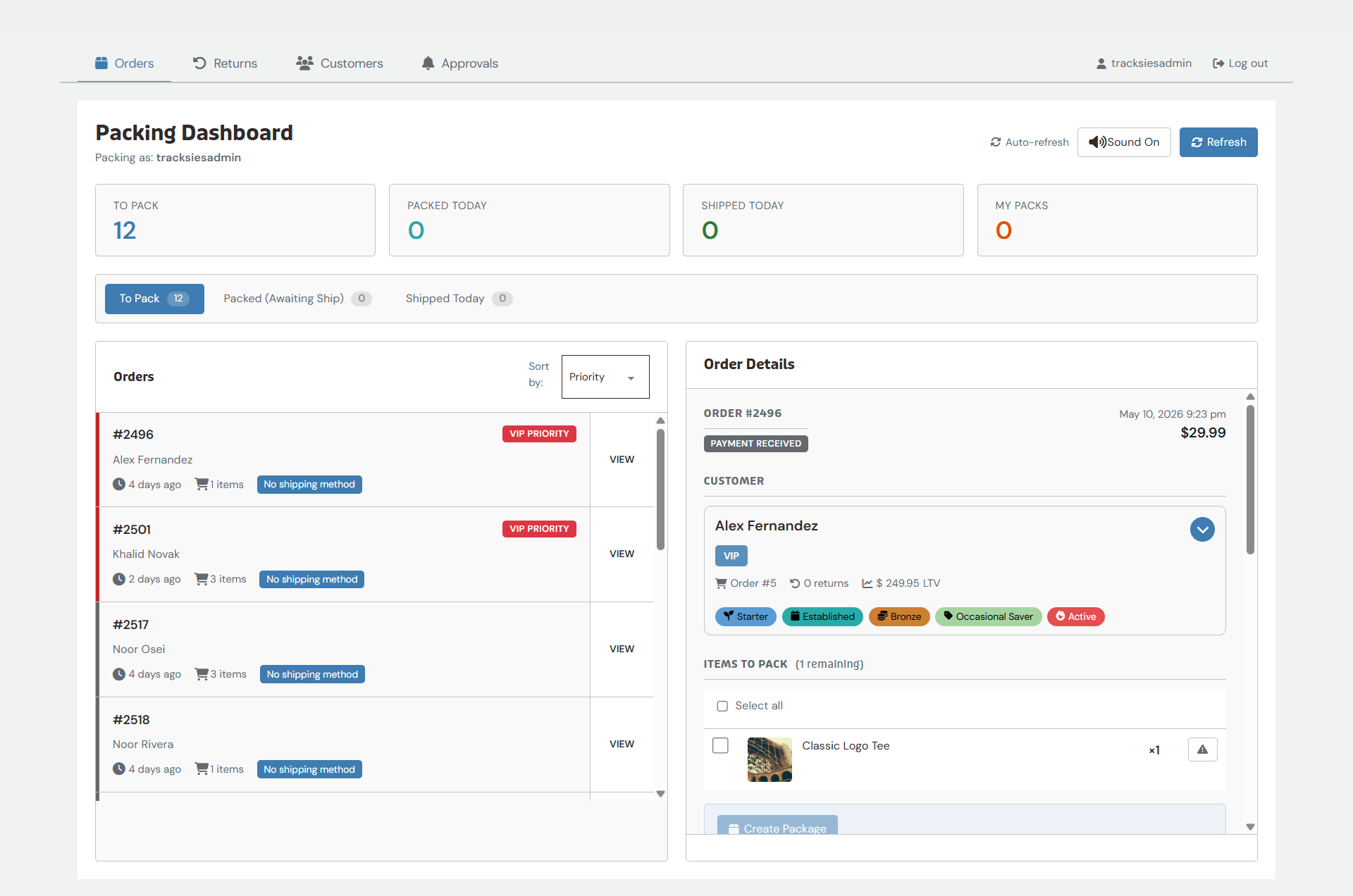
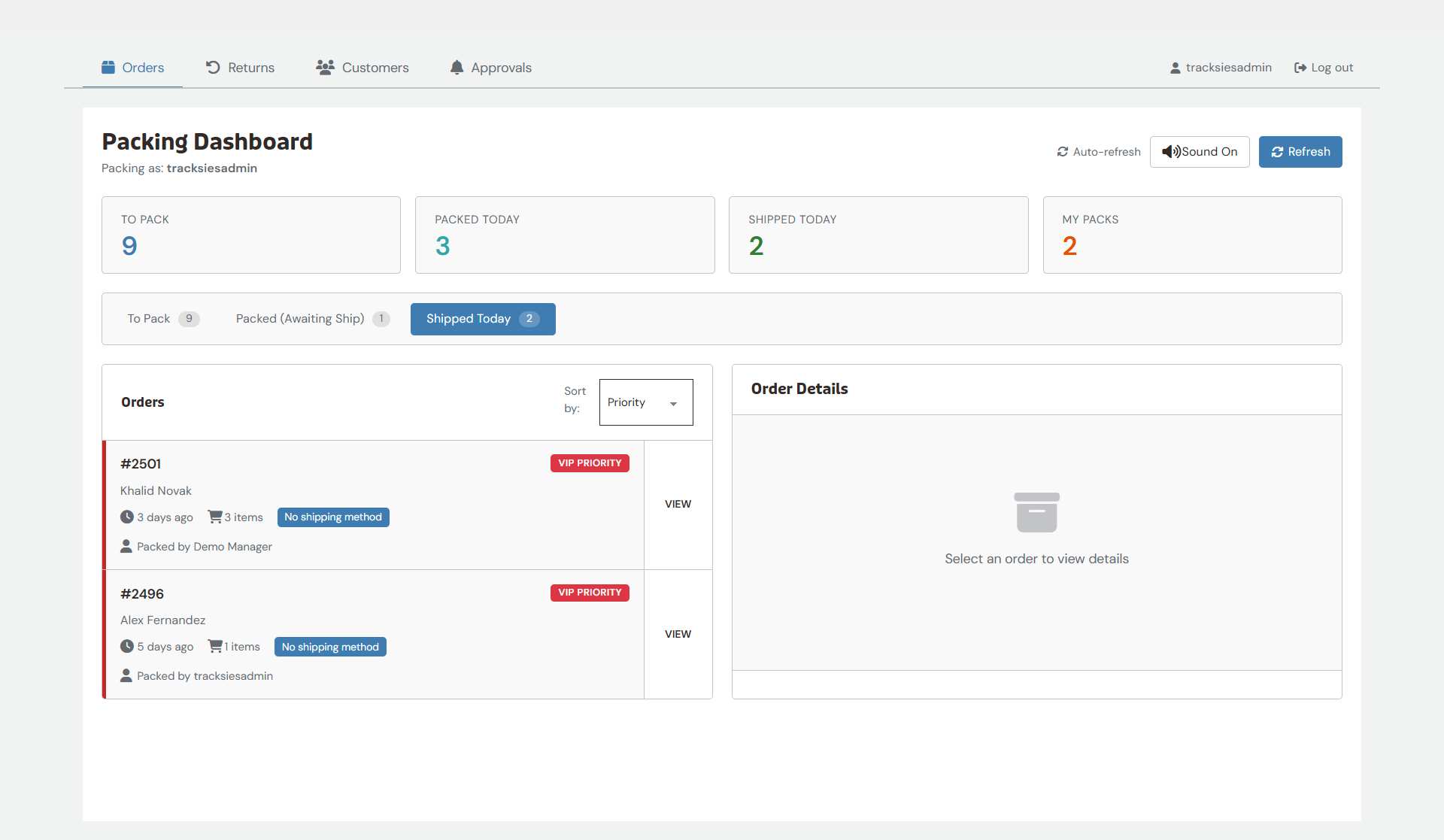
Once it’s packed, the card moves to Packed with your packer’s name on it. No chance of that order getting packed again. When it’s marked shipped, it moves to Shipped. Each order’s status is visible to the whole team — no surprise double-packs, no “wait, did anyone do order #2147 yet?” Just clarity, in real time.
Packsie packs (lolz) a lot of pretty unique stuff so we’ve broken it down for a quick glance. Click on the head-with-tie to see a Store Manager on our Have A Go Demo, no-tie to log in as a customer (randomly chosen, so you can log in again and see another customer story), click the docs to get the tech specs, and Read More to deep dive into the features.
Packsie is a WordPress plugin that adds a frontend packing dashboard, frontend returns dashboard, and staff role management to WooCommerce shops running Tracksies HQ. Your packers and returns staff get a clean page on your site where they handle orders and returns without needing access to your WordPress admin area. Built for shops with one or more staff helping with fulfilment, or for solo shop owners who’d rather pack on a focused page than in WordPress admin.
Part of the Tracksies suite: works with HQ (required), Trustie (reviews), Perkie (loyalty), and Squizzie (analytics).
Yes. Packsie is the team-and-frontend extension of HQ as it reads HQ’s priority rules, custom order statuses, returns settings, customer tags and flags, and brand styling. Without HQ, Packsie has nothing to extend.
Packsie gives your team a frontend packing dashboard and a frontend returns dashboard: clean pages on your site where they handle the work, with permissions that let you control exactly what each role can see and do. Packers can pack orders, mark shipped, attach tracking, leave notes. Returns staff can inspect returns, recommend resolutions, and process refunds (subject to authorisation rules you set).
Crucially: nobody on your team needs access to your WordPress admin area. They log into a dashboard page that’s branded to match your site, do their work, and that’s it. You decide who can see what. You sign off on the actions that move money.
Packsie reads everything HQ already knows: priority rules, custom order statuses, returns settings, customer flags and tags, the Designer’s brand styling. Configure your shop once in HQ; Packsie shows your team the relevant pieces without asking you to set anything up twice.
Think of it as HQ’s dashboard, but on a page of your site, with role-based permissions controlling who sees what.
That’s your call. Packsie’s permissions matrix lets you decide exactly what each role sees in the customer interactions timeline. Some shops want every staff member to see a customer’s full notes; others want packers to see only what’s relevant to packing. Configure once in Packsie settings and the visibility rules apply automatically across every dashboard view.
Yes. Refund authorisation is a separate permission per role. A packer can be allowed to inspect a return, record condition, and recommend a refund — but pressing the actual Refund button can be limited to Shop Manager, Administrator, or any custom role you choose. When a lower-permission staff member hits Refund, the action queues for an authorised user to approve. The actual refund only fires after approval.
You can also collapse the two steps for shops where the same person inspects and authorises. Tick the refund-authoriser permission on the inspector role and the queued step is skipped.
Yes — they need WordPress user accounts to log in, but those accounts don’t need to have administrator or shop-manager privileges. Packsie ships with a Packer role that has just enough permission to use the dashboard and nothing else. No Plugins, Posts, Themes, or Users menu visible. They log in via a regular login page, land on the dashboard, and that’s all they see.
The Packer role also stacks on top of other WordPress roles, so a content writer who’s also helping pack during busy season can have Editor + Packer; a team member with their own customer account can have Customer + Packer.
Yes. Packsie’s dashboards are available as a shortcode ([tracksies_staff_dashboard] and [tracksies_returns_dashboard]) that works with any page builder. Bricks, Divi, and Gutenberg shops also get a native Bricks element for the staff dashboard: same dashboard, same permissions, same protections, just available in the Bricks element panel where you’d expect to find it.
Yes. Packsie includes an optional kiosk mode template that strips your theme’s header, footer, and chrome away so the dashboard fills the screen; useful for a tablet on a packing bench or a shared terminal in the warehouse. Switch it on per page in Packsie settings.
Yes. Search engines are blocked from indexing dashboard pages (a noindex, nofollow robots tag is added automatically). Logged-out visitors are redirected to the login page. Logged-in users without the right role see Access Denied. Every action re-checks the user’s permissions on submission, so stale tabs and shared sessions can’t fire actions inappropriately.
Any role you’d find useful. Common patterns include Warehouse Lead, Casual Packer, Returns Inspector, Refund Authoriser, Senior Packer. Each role gets the same permission matrix to pick from — packing dashboard access, returns dashboard access, refund authorisation, interaction visibility. Members, User Role Editor, and Capability Manager Enhanced all work cleanly alongside Packsie’s permissions.
No, we don’t do bundles or sales. But you do get a discount of 20% on renewals to say thanks for sticking with us.
Prices may go up in future, so grab Packsie now for the best price.
Yes — Packsie is a WordPress plugin that runs on your hosting. Your staff data, packing logs, returns history, audit trail — all of it lives in your own WordPress database, on your own server. No external dashboard, no SaaS subscription, no surprises if your renewal lapses.
Almost certainly. The alternative is configuring user roles by hand, custom-coding role-restricted admin pages, and explaining wp-admin to your client’s packing staff. Packsie ships the Packer role, the frontend dashboards, the role-permission matrix, the kiosk mode, and the audit log — all configurable from the Tracksies settings page your client is already using for HQ.
For the technical detail (hooks and filters, REST API, page builder integration, role manager plugin compatibility), see the Packsie docs.
No reviews yet.