
Running log tabs that append, so a trend builds without anyone taking snapshots.
14-day refund
2 Sites
For one store you look after, with room to build safely.
$99.00, and renews at $79.00 a year
Get Solo5 Sites
For freelancers and small studios with a handful of clients.
$178.00, and renews at $142.00 a year
Get Studio20 Sites
For agencies running maintenance plans across a client base.
$297.00, and renews at $238.00 a year
Get AgencyYou already have the numbers. They’re just in about seven places, and nobody opens all seven on the same afternoon.
Squizzie brings your orders, your Google data, your contact forms and your reviews into one report over the same dates, in your own fonts and colours, ready to send to whoever needs it. The useful questions live between those sources: how many people came, and how many of them bought.
So go and read one. Click the head-with-tie to sign in as a Store Manager on our Have A Go Demo, find Squizzie in the menu, and run a report over any dates you like. Then browse the feature cards below, tap the docs for the technical detail, and hit Read More on any card to go deeper.
The buttons are your data sources. A good few of them are other Tracksies plugins, so your reviews, your support load, your loyalty numbers and your site searches all come through to the same report as your orders and your Google figures. Plug in more, and more of it fills out.
These four came out of our demo store rather than a design file. The numbers are whatever Have A Go had in it on the day, and they move when the demo’s data does, because the reports get regenerated rather than redrawn.
They are our reports, though. Yours can show what you need to know, laid out your way, in your own colours, arriving daily, weekly or monthly at the time you pick, to whichever addresses you choose.
Click through on any of them and you will get that report built from the demo store’s data as it stands today.
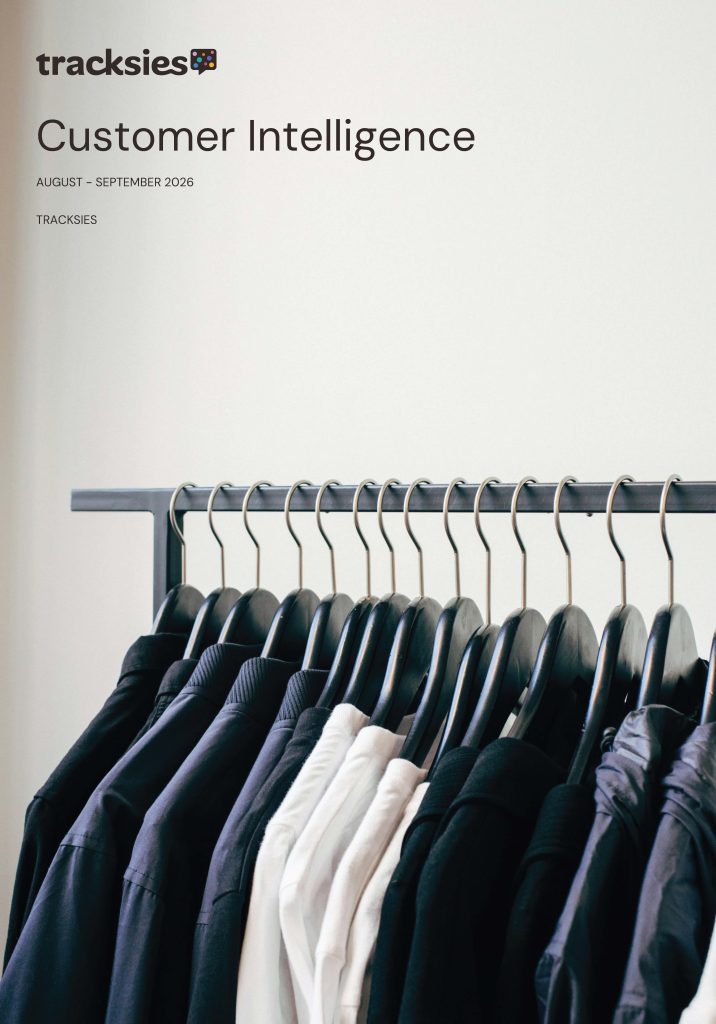
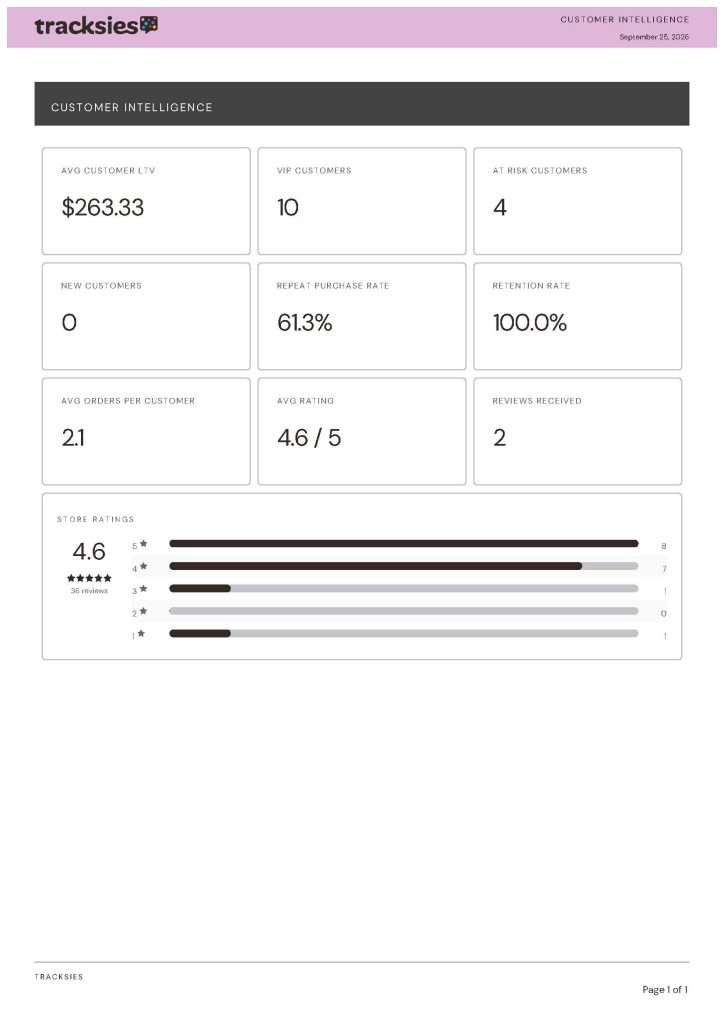
Who your best customers are, who is drifting, and what they think of you. Lifetime value, repeat and retention rates, and your ratings broken down by score.
Portrait cover with a photograph behind it, and the only one here with a coloured header bar, in soft pink with dark text.
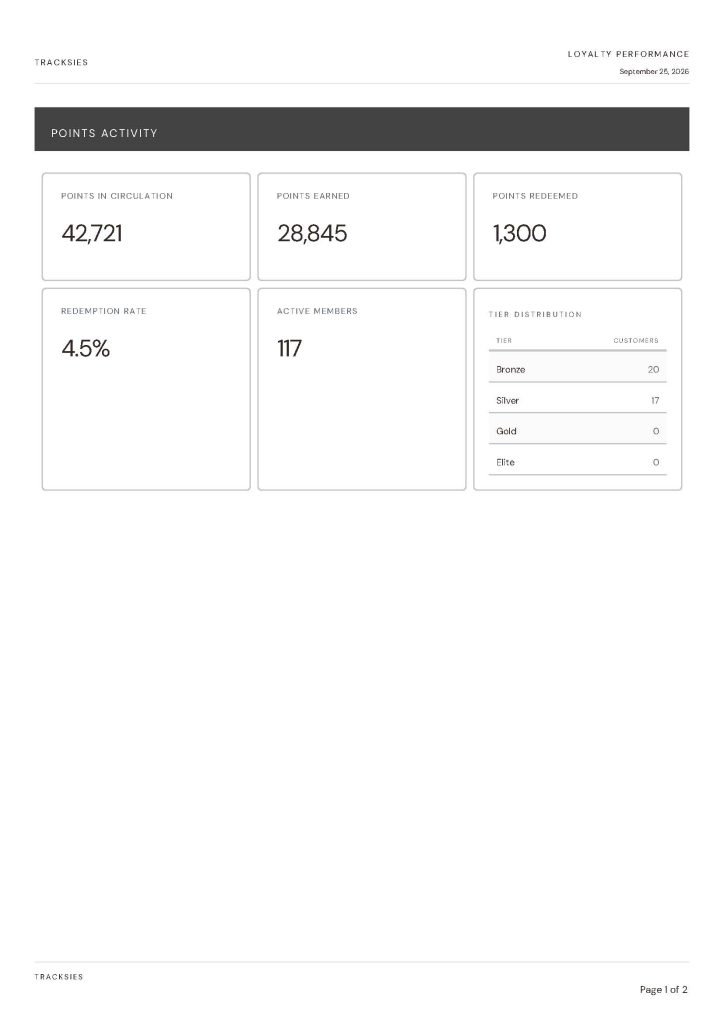
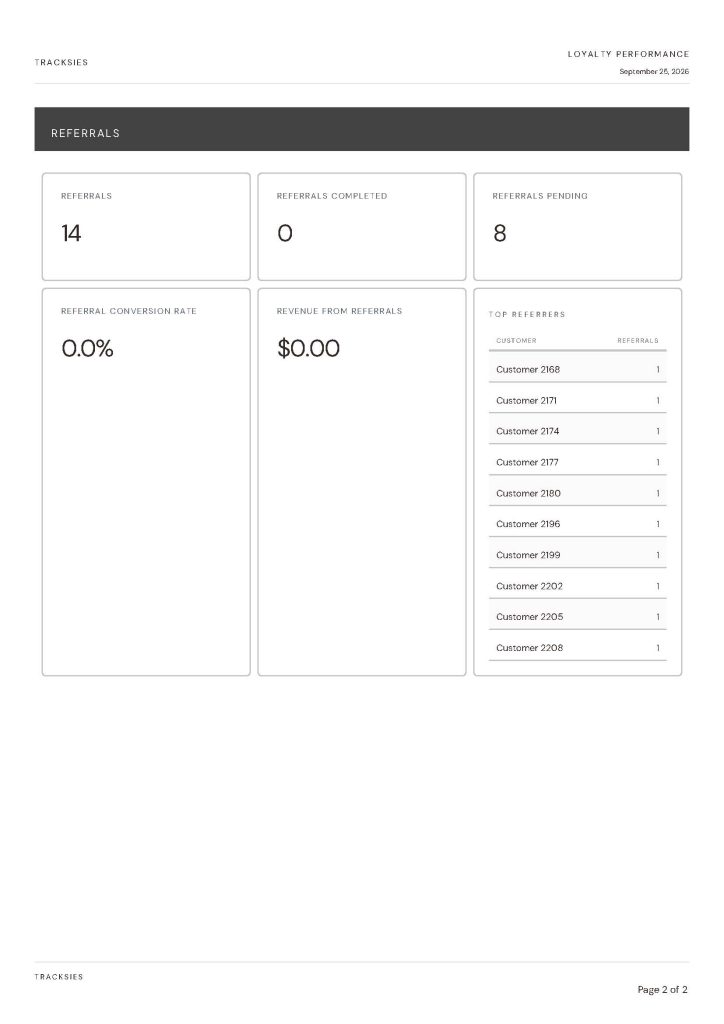
Where your points sit and who is using them. Points in circulation, earned and redeemed, how many members are active, and how they spread across your tiers.
Left on the defaults, so you can see what one of these looks like before anyone has touched it.
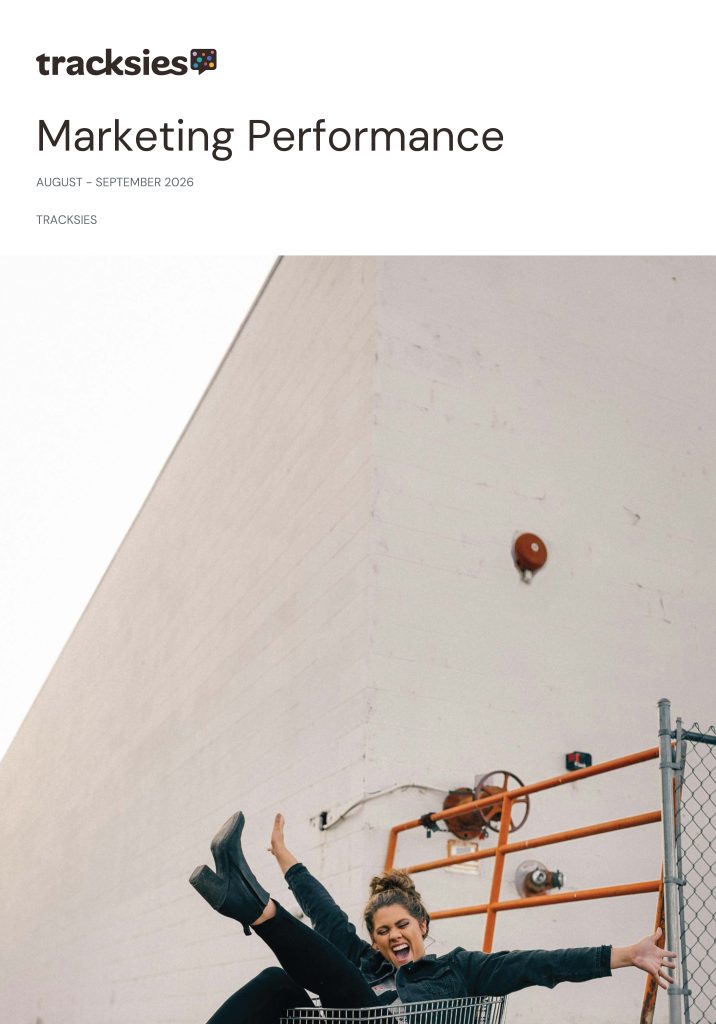
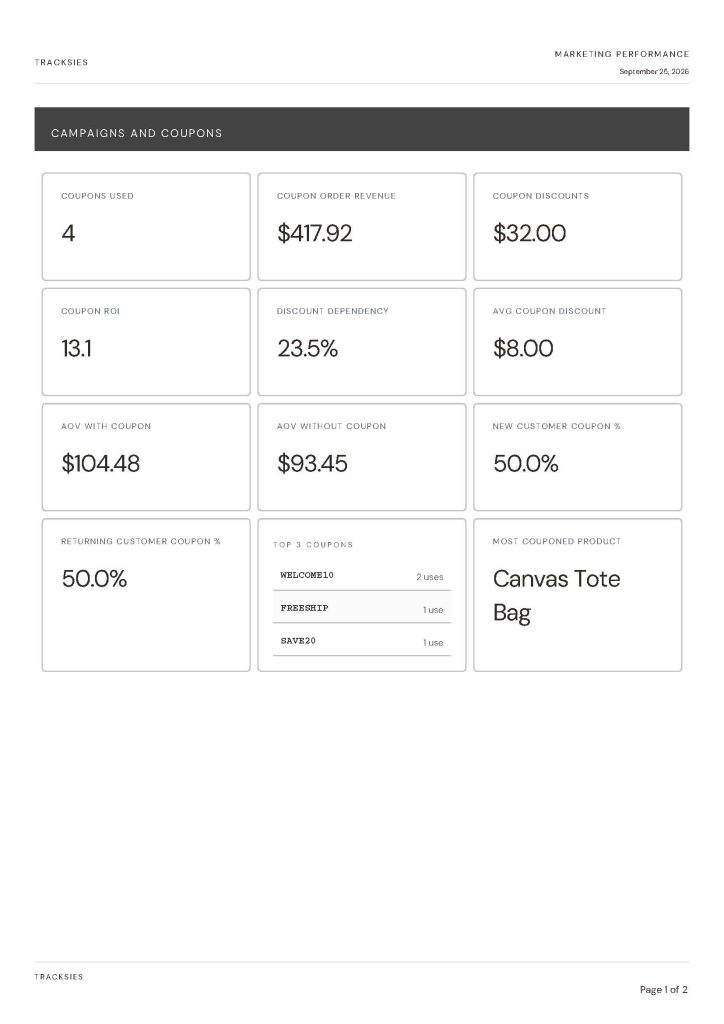
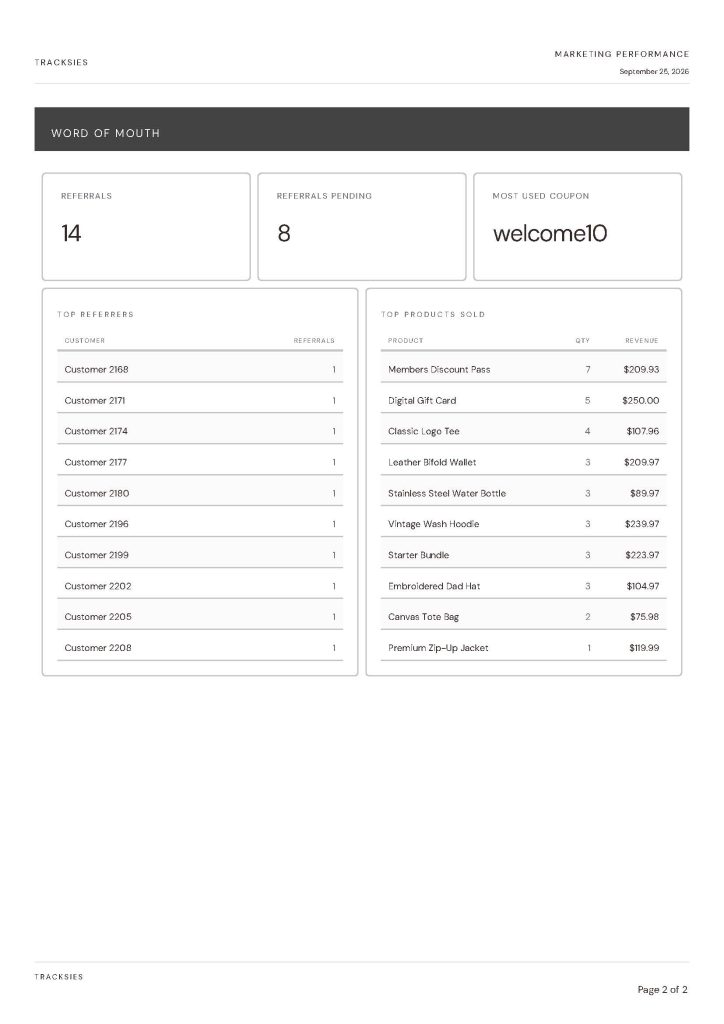
Whether your discounting is working. What the coupons cost, what they brought back, how much of your revenue leans on them, and whether they pull new customers in or reward the regulars.
Portrait cover with no background image, and the tables given two pages rather than crammed onto one.
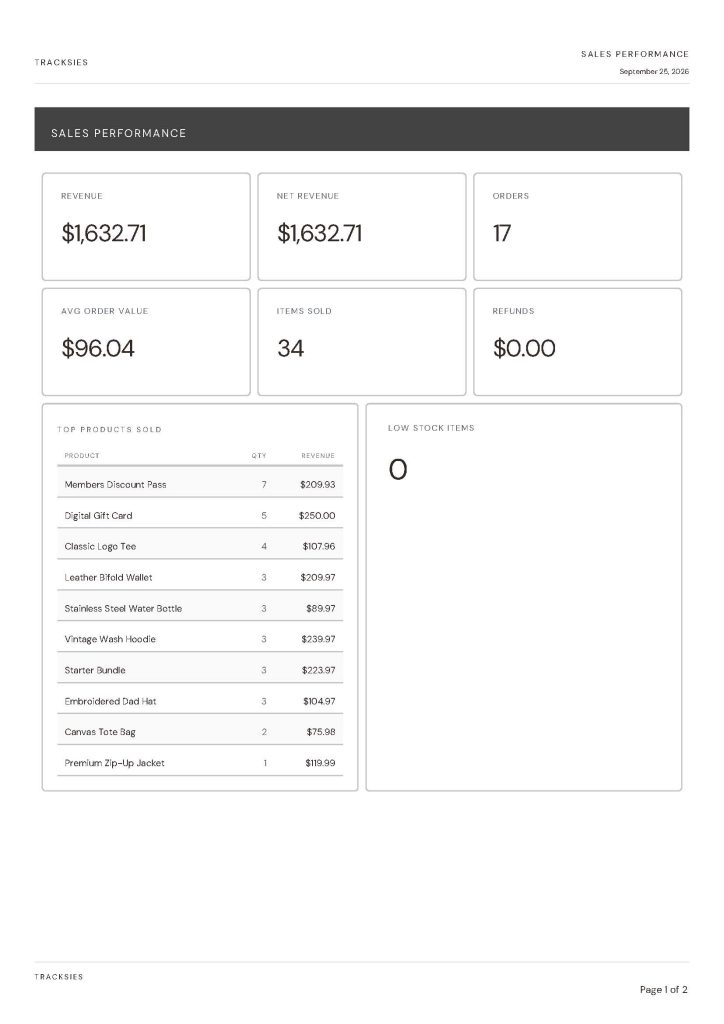
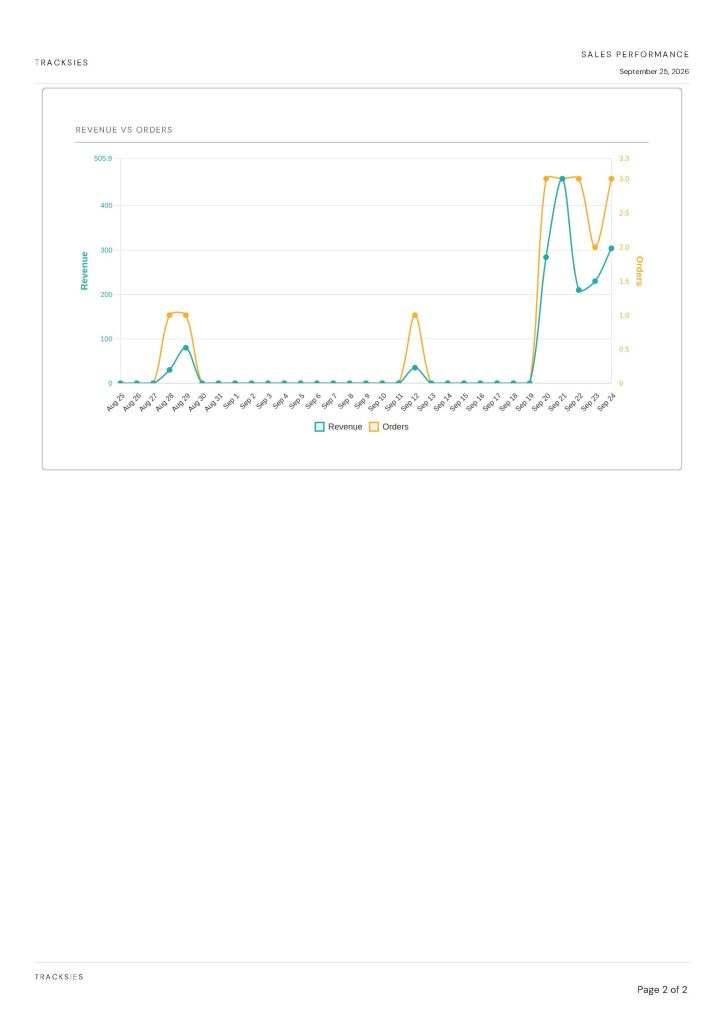
The period’s trading in one place. Revenue and net revenue, orders, average order value, refunds, what sold most, and what is running low.
Three-zone cover, with the date and business name picked out in mulberry so they sit apart from the heading. Three columns to a row, then two.
Squizzie is a reporting suite for WordPress and WooCommerce. It pulls up to nineteen data sources into a single report covering the same dates, renders it in your own fonts and colours, and sends it to whoever needs it, however they need to see it. Your shop, your Google properties, your contact forms and your reviews, in one place instead of seven tabs.
If you find yourself opening three or four dashboards to answer one question, yes. It suits shop owners who want the week in one view, and agencies who need to send a client something that looks like the client’s brand rather than like a plugin.
Yes. The shop sources only switch on when WooCommerce is there, and nothing breaks without it. On a services site you still get Google Analytics, Search Console, Business Profile, PageSpeed, your contact forms, your site search and your reviews. Form conversion rate is arguably a better question for a services site than for a shop, because there the form is the sale.
You need something that reads both over one date range. Squizzie registers up to nineteen data sources, including your WooCommerce orders and your GA4 property, and builds a single report across whichever ones you pick. It adds no tracking script to your site; it reads the Analytics property you already have through Google’s reporting API.
No. Squizzie’s WooCommerce sources only register when WooCommerce is active, and everything else keeps working without it. On a site that sells nothing you still get Google Analytics, Search Console, Business Profile, PageSpeed and your contact forms.
Nineteen data sources. Your WooCommerce orders, products and customers; Google Analytics, Search Console and Business Profile; PageSpeed; your contact forms; your reviews; and the other Tracksies plugins if you run them.
Plenty of tools do one part of it well. Analytics plugins report your traffic, WooCommerce’s own reports cover your orders, and the SaaS reporting suites do a polished job of both for a monthly fee. What is unusual about Squizzie is the combination: your shop and your Google data and your form conversions in one report, kept on your own site, with no monthly bill and no per-order fee.
Squizzie reads your existing GA4 property through Google’s reporting API, so the numbers match what you would see in Analytics itself. Sessions, users, bounce rate, conversions and traffic by source all come across, and they sit next to your orders over the same dates.
Both connect alongside Analytics. Impressions, clicks and queries come from Search Console, and your local listing’s ratings and activity from Business Profile, so how people find you sits in the same report as what they did once they arrived.
Only where your costs are already recorded. Squizzie reads your cost of goods from wherever it lives, either WooCommerce’s own cost-of-goods support or a COGS plugin, and reports profit and margin from that. It reads your costs, it does not invent them, so if nothing is recorded there is nothing to report.
Squizzie reads your ad spend, clicks, impressions, cost per click and spend by campaign from the Google Analytics property it already connects to. There is no separate Google Ads connection to set up. The figures appear once a Google Ads account is linked to that property, or once cost data from another platform has been imported into it.
Return on ad spend is then your revenue divided by that spend, and this is where Squizzie differs from an analytics tool. Google divides by the revenue its tracking script managed to see. Squizzie divides by your order records.
Those are different numbers, because a script misses sales routinely: an ad blocker running, a cookie banner declined, a tag that failed to load. Every one of those was a real order that took real money, and your database has it. So Google’s figure reads lower than reality, and Squizzie’s counts every order you actually took. It can only do that because it sits inside the shop rather than beside it.
Where no ad account is linked and no cost has been imported, there is no spend, so there is no return on ad spend. Squizzie shows nothing rather than zero, because a zero would read as though your advertising failed when the truth is that nobody has told it what was spent.
Yes. Reports render as PDFs using the fonts, colours and logo from the Designer, so what you send your accountant or your client looks like you rather than like a plugin.
Yes, and on a separate schedule for each recipient. Your accountant can get one at quarter end while the ads people get one every Monday, from the same report.
Yes. Squizzie exports to Google Sheets, and can keep running log tabs that append each time, so a trend builds up over months without anyone remembering to take a snapshot.
Yes, and it keeps itself up to date. Set a report to export to Google Sheets on a schedule, and each time it runs Squizzie appends a single date-stamped line per metric, each metric to its own tab. Nobody has to remember to take a snapshot, and after six months there’s a trend sitting there that nobody had to build.
Sharing is your side of it: you give your accountant or your ads manager access to that one spreadsheet in Google. They get the numbers they need on their own schedule, without a login to your WordPress admin, and they see only what’s on that sheet.
If the export ever fails, a changed permission being the usual culprit, your scheduled email still goes out, Squizzie notes that the spreadsheet was skipped, and it tries again on the next run.
Gravity Forms, Fluent Forms, and Contact Form 7 when Flamingo is storing the entries. Submissions become a reportable source like any other, so they can sit beside your traffic over the same dates.
Squizzie divides your form submissions by your Analytics sessions, which is a figure almost nothing else computes because it needs a number from two different places. That is also why it withholds itself: if you have forms but no Analytics connected, Squizzie leaves the tile out rather than showing you half a calculation.
No, and Squizzie does not add one. There is no tag, no pixel and no script of ours on your pages. Your Analytics figures are read from the Google property you already have, through Google’s own reporting API.
Squizzie doesn’t. Reports are built when you ask for one or when a schedule fires, in the admin, not on the pages your customers load. There’s no tracking script, so your front end carries nothing extra.
On your own site, always. Your reports and your figures sit in your website’s own database, the same place your orders and your pages already live. There is no dashboard of ours holding a copy, and nothing about your shop or your customers passes through us.
That is rather the point. Perkie adds fourteen loyalty and referral figures, Helpie eleven support figures, and Fetchie seven search figures, all available to any Squizzie report alongside your store and Google data rather than sitting in a tab of their own.
No. Squizzie reports on your shop and your Google data on its own. The others simply add more to report on: Perkie brings loyalty and referral figures, Helpie support figures, and Fetchie search figures. Nothing is missing if you don’t run them.
Two ways, and the first needs no setup at all.
The first way: export a report to Google Sheets, or download the CSV or the PDF, and hand that to whichever assistant you use. It’s your data in a file, so it works with anything, today, and nothing on your site has to change.
The connected way. Before the detail, the reassurance: nothing here sends anything anywhere by itself. Squizzie registers three read-only abilities. They sit there doing nothing until something asks, they can’t change a thing on your site, and they only answer someone who is already allowed to view your reports.
Modern WordPress does the rest of the work. The Abilities API is part of WordPress itself now, along with the endpoints that list and run abilities and a built-in AI client, so Squizzie’s numbers are reachable by an assistant without any bridge plugin from us. What they return: current values for the metrics you name over a date range, a time series by day, week or month, and coupon orders, revenue and discount for a campaign.
Two honest notes. If your assistant speaks MCP specifically, that protocol endpoint still comes from an adapter rather than from WordPress itself. And on an older WordPress without the Abilities API the abilities simply don’t register, which breaks nothing and costs you nothing.
One detail worth knowing whichever camp you’re in. Squizzie does read your ad spend, but Google records it against campaigns, and a coupon code is not a campaign. One code can run across three of them. So ask about a coupon and Squizzie gives you the orders, the revenue and the discount, then says plainly that it cannot pin a cost to that particular code and points at the campaign figures instead. We would rather it said so than hand a machine a number that looks attributed and isn’t.
So many three letter acronyms, OMG (there’s another!). No need to fret, our docs will sort you out and Helpie is there to ask if you get stuck. And Sarah is only an email away.
Yes, and mostly because of what you can hand over. A branded PDF landing in the client’s inbox every Monday, in their fonts and colours, is the kind of thing that makes you look good long after the build is finished. Your licence covers two, five or twenty sites depending on the tier, so staging and a few client builds are covered without buying again.
WordPress 6.0 or newer and PHP 7.4 or newer. If you want the shop reports you’ll need WooCommerce 7.0 or newer, though Squizzie runs perfectly well without a shop.
Your site keeps working and your data stays where it is, in your database. You stop receiving updates and support, and reports stop being generated. Nothing is deleted.
Fourteen days, for any reason. Install it, connect your own data and run a few real reports. If it isn’t earning its place, tell us and we’ll refund you.
Because a reporting tool you can’t trust the numbers in isn’t worth installing. A free tier would mean cutting the data sources back, or holding out the branded PDFs and the scheduling, and what was left wouldn’t answer the question you arrived with. Trustie, our reviews plugin, does split cleanly into a complete free version and a paid one. Squizzie doesn’t divide that way. So we keep it whole, price it flat, and back it with a 14-day refund.
$99 for your first year ($79 annual licence plus a one-off $20 sign-up), then $79 a year to renew. That is Solo, for two sites. Studio covers five at $178 and Agency twenty at $297. No monthly bills and no per-order fees, and renewals are already discounted.
Two, five or twenty, depending on the tier you pick. Every tier updates from the one licence, so your live site, a staging copy and your client sites are covered without buying again. Staging counts as an activation like any other site, which is why the smallest tier is two rather than one.
No reviews yet.